

With 64 GB RAM and an RTX 5060 Ti 16 GB, this PC successfully loaded Qwen3.8-Flash-Next UD-IQ4_XS and processed inference requests. This test uses the Huihui v2 version, running through Strata 0.1.47. Of the installed 64 GB RAM, 63.8 GB is treated as the total usable system capacity. All routed experts in the main model occupy approximately 55.43 GB, and the startup log shows that the entire allocation was locked in physical RAM. In the recorded snapshot, the Strata engine used approximately 13.39 GB VRAM; actual usage varies by workload.
This configuration works by distributing model data across RAM, VRAM, and disk: of the 87.25 GB main model file, approximately 26.82 GB is a PLE table read from disk on demand, while the GPU holds a cache of frequently used experts and other computation data. System-wide pagefile usage was approximately 2.46 GB in the recorded snapshot; it could not be attributed precisely to Strata, while prior normal operation left approximately 1–2 GB of available RAM. Using measurements taken after inference requests had run, this article breaks down the capacity and proportions of these four resource categories, explaining how this 64 GB RAM machine runs the model and what the available evidence can establish.
This configuration also sets STRATA_, disabling route tail skipping so that routed experts which would otherwise meet the skip criteria still participate in computation. This setting affects decode speed and output, making it an important condition for interpreting the performance figures below.
Measured speed: 32K prefill and 4K decode
On the same RTX 5060 Ti 16 GB and 64 GB RAM PC, these tests use Huihui v2 UD-IQ4_XS with Strata 0.1.47 and a configured context limit of 64K (65,536 tokens). These performance results were measured separately from the earlier memory snapshot reported in this article. Available RAM is given as the range observed during prior normal operation.
Retested on October 24, 2026: The results below were obtained after restarting Strata, using the same benchmark procedure.
| Test | Run 1 (tok/s) | Run 2 (tok/s) | Run 3 (tok/s) | Median (tok/s) |
|---|---|---|---|---|
| 32K Prefill | 1,268.9 | 1,294.2 | 1,295.3 | 1,294.2 |
| 4K Decode | 43.2 | 39.8 | 48.4 | 43.2 |
Test conditions:
- Prefill: 32,768 input tokens per run, measuring prompt-processing speed.
- Decode: 4,096 input tokens and a full 512 output tokens per run, measuring generation speed. “4K” refers to the input length.
- Code workload, temperature 0, thinking disabled.
- Three runs for each test, six requests in total. Prompt-cache hits were confirmed to be 0 for every request.
- Speeds use engine-reported timing. Each median is calculated from the three runs of its respective test.
Measurement conditions and units
Except for explicitly stated parameter units (MiB/GiB), capacities in this article are calculated as bytes ÷ 1024³ and labeled GB, following the labels used by this PC’s Windows memory display. This is a binary conversion, distinct from the decimal GB used by drive manufacturers. All RAM percentages use the user-specified 63.8 GB as their denominator. Here, “63.8 GB usable capacity” means the total physical RAM available for system use, rather than the amount currently unused.
| Item | Configuration and measurement conditions |
|---|---|
| GPU | NVIDIA GeForce RTX 5060 Ti, 16 GB VRAM |
| VRAM reserve | --vram-reserve-mib 700: 700 MiB |
| RAM | 64 GB installed; percentages use the total usable capacity of 63.8 GB |
| Strata | 0.1.47, CUDA 13; corresponding source commit 76f90e58436d |
| Model | Qwen3.8-Flash-Next Huihui v2, UD-IQ4_XS, three GGUF shards |
| Execution mode | Entire main-model expert arena loaded; expert-cache auto; prefill auto |
| Route tail skipping | STRATA_;disabled |
| Context and speculative decoding | max-context 65,536, KV int8, spec 4, spec-min-p 0.5, MTP enabled |
| KV cache placement | KV streaming disabled; –kv-resident omitted; KV cache entirely in VRAM |
| Other settings | HC Q8 enabled; Vision enabled and set to CPU; PLE uses direct I/O |
| Timing | Startup: 2026-10-23 17:47; main snapshot: 2026-10-24 00:22, UTC+8; the control process was checked separately afterward |
| Measurement scope | A snapshot after the model was loaded and requests had run; not a peak test at full context or under heavy load |
Below, “measured” refers to Windows counters or file lengths; “allocated” refers to this startup log and the matching source version; and “estimated” includes calculations across counters without page-by-page deduplication. Results will vary with workload, other applications, settings, and measurement time.
Leaving more RAM for experts: disabling KV streaming
To leave more RAM available for expert weights, this configuration removes --kv-resident 32768 and disables KV streaming, keeping the KV cache entirely in VRAM. Compared with the previous configuration, this saves approximately 0.77 GB of pinned RAM while increasing the KV cache’s VRAM footprint by an estimated 0.39 GB, leaving less room for the GPU expert cache. The context limit remains 64K (65,536 tokens) and KV precision remains INT8. The main-model expert weights remain resident in RAM.
Overview of the four resource categories
| Resource | Capacity / usage | Percentage and denominator | Evidence and scope |
|---|---|---|---|
| VRAM: Strata engine | 13.39 GB | 83.70% / 16 GB | Windows GPU per-process dedicated memory snapshot |
| RAM: all main-model routed experts | Approx. 55.43 GB | 86.88% / 63.8 GB | Weight payload; this startup log shows that the entire arena was locked |
| RAM: Strata overall | Roughly 56.4 GB | Approx. 88.4% / 63.8 GB | Includes engine, control, and Vision processes; an estimate across counters, not an exact page-by-page total |
| Disk paging: system-wide usage | 2.46 GB | 5.35% / 46 GB pagefile | A system-wide figure that cannot be assigned to an individual process |
| Disk: model and supporting files | 90.25 GB | 97.64% / 92.44 GB of inventoried deployment files | Main model, pack, MTP, and Vision |
| Disk: model plus installed software | 92.44 GB | 100% / this deployment inventory | Excludes the system pagefile, other models, installers, and logs |
These four categories cannot simply be added to obtain the model size. Disk stores the model files, RAM holds expert weights, and VRAM holds cached copies of some of those experts. The same logical weights can occupy different hardware resources simultaneously. The pagefile is also on disk and must not be counted twice in a disk-space total.
RAM: where do all 55.43 GB of expert weights reside?
The pack’s expert index records the main model’s routed-expert payload as 59,519,795,200 bytes, or approximately 55.43 GB. Tensor metadata from the three GGUF files gives the same result. This covers 48 layers with 512 routed experts per layer, totaling 24,576 “layer × expert” combinations. Allocation alignment adds a very small amount of overhead.
The log entries “44 GB pinned” and “10.78 GB VirtualLock” describe two sections of the same expert arena, rather than two additional sets of weights:
| Locking method | Capacity | Share of 63.8 GB RAM | Interpretation |
|---|---|---|---|
| CUDA pinned, first 39 slices | Approx. 44.65 GB | 69.99% | The original log prints only the integer 44; the corresponding weight segments total approximately 44.65 |
| VirtualLock, remaining tail | Approx. 10.78 GB | 16.90% | After CUDA could not register every segment, the remaining tail used Windows locking |
| Total main-model expert payload | Approx. 55.43 GB | 86.88% | The two methods cover the entire arena; the locked-tail figure includes alignment differences |
According to this startup log and the matching pinned-memory implementation, the program first performs CUDA host registration segment by segment, then calls the resident lock only for the remaining tail. The success message for the tail means that VirtualLock completed for that section. We can therefore conclude that the entire main-model expert arena was successfully locked in physical RAM during this load. This conclusion follows from the log and code path, rather than from a page-by-page scan of the entire process.
Microsoft’s VirtualLock documentation states that successfully locked pages remain in physical memory and are not written to the pagefile until they are unlocked or the process terminates. CUDA page-locked host memory is likewise nonpageable host memory. Failure to register the whole allocation with CUDA, or failure to obtain large pages, alone does not establish that experts were swapped to disk. This run still succeeded through segment-by-segment pinning and the VirtualLock fallback.
“All experts” here specifically means the main model’s routed experts. Embeddings, PLE, other main-model weights, MTP, and Vision are accounted for separately. It does not mean that the entire 87.25 GB GGUF on disk resides in RAM.
What else must fit in the 8.37 GB left after the experts?
63.8 − 55.43 ≈ 8.37 GB. This is approximately 13.12% of RAM and must accommodate Strata’s other host data, Windows, drivers, other applications, and currently available memory. It is neither a fixed Windows footprint nor headroom reserved entirely for Strata.
| Other Strata RAM items | Capacity | Share of 63.8 GB | Type of figure / explanation |
|---|---|---|---|
| Token embedding, Q8_0 | Approx. 0.6290 GB | 0.9860% | Loaded as mapped host memory in this run; checked against tensor size |
| PLE prefill double buffer | Approx. 0.1563 GB | 0.2449% | Allocation calculated for an 8,192-token chunk; not the entire PLE table |
| Expert host staging, default 16 slots | Approx. 0.05188 GB | 0.0813% | Calculated from the largest expert blob and the default slot count; not an independently measured resident footprint |
| Prefill routing ids / slots / sources | Approx. 0.000916 GB | 0.001435% | Calculated allocation for three host integer arrays |
| Token ID host / upload buffer | Approx. 0.000061 GB | 0.000096% | Allocation calculated for an 8,192-token chunk |
| QSA steps host / upload buffer | Approx. 0.000244 GB | 0.000383% | Calculated for 4 steps |
| Python control process working set | Approx. 0.0144 GB | Approx. 0.0226% | Working set at the follow-up check; does not represent commit or total allocated memory |
| Vision CPU process working set | Approx. 0.00057 GB | Approx. 0.0009% | Very small at the snapshot; this does not establish that the vision weights consume no resources |
| Other allocations and overhead | Not measured separately | Could not be split precisely | Routing group tables, CPU worker stacks / scratch, verification host staging, checkpoints, indexes, and CUDA / driver management data, among others |
Allocated capacity and a current working set are different measures, so this table should not be summed as an exact resident footprint. At startup, approximately 0.7813 GB is temporarily reserved for later pinned buffers and progressively returned or released during initialization. This temporary startup reserve should not be counted as an additional permanent RAM allocation. It is separate from the 1–2 GB of available RAM remaining during normal operation. See the code for prefill buffer allocation and the pin-budget release process.
How much RAM do Strata and the operating system each use?
Windows reported approximately 10.79 GB for the Strata main engine’s working set and approximately 45.60 GB for GPU SharedUsage. Shared GPU memory uses system RAM; it is neither extra physical VRAM nor the pagefile. Looking only at the process’s 10.79 GB working set misses a large amount of host memory reflected by GPU / driver-related counters in this configuration.
Cross-checking these two counters alongside the control and Vision working sets gives an order-of-magnitude estimate of approximately 56.4 GB for Strata overall. However, these counters have not been deduplicated page by page. Microsoft’s explanation of GPU counters also notes that per-process figures may include shared resources. The following table is therefore a rough allocation, not an exact accounting:
| Estimated RAM allocation | Approx. GB | Share of 63.8 GB |
|---|---|---|
| Main-model expert payload | 55.43 | 86.88% |
| Rest of Strata | 0.97 | Approx. 1.52% |
| Windows, drivers, and other applications | 5.4–6.4 | Approx. 8.46–10.03% |
| Available RAM during normal operation | 1–2 | Approx. 1.57–3.13% |
“Rest of Strata” is the estimated difference between approximately 56.4 GB and the expert payload. “Windows, drivers, and other applications” is inferred as 63.8 − 56.4 − (1–2) ≈ 5.4–6.4 GB. This range inherits the uncertainty in the Strata estimate and is not a separate measurement. More available RAM corresponds to a smaller inferred remainder. The more reliable conclusion is that experts already occupy approximately 86.88%, leaving only approximately 8.37 GB of capacity for everything else combined. Normal operation leaves approximately 1–2 GB of available RAM, or 1.57–3.13% of total capacity.
VRAM: allocation and reserved headroom on a 16 GB GPU
16 GB VRAM is shared by Strata’s GPU expert cache, other weights, and runtime allocations. --vram-reserve-mib is set to 700 MiB, providing general headroom when sizing the expert cache. The Vision image encoder runs on the CPU in this setup and does not require its own GPU-memory reserve. The 13.39 GB below is a snapshot of Strata’s measured usage, not a fixed limit or a peak.
The Windows GPU dedicated-memory counter in the earlier snapshot shows approximately 13.39 GB used by the Strata engine, or 83.70% of 16 GB. The adapter-wide counter shows approximately 14.07 GB. Its difference from the Strata process counter, approximately 0.67 GB, gives an indication of other processes and system graphics load; the difference has not been deduplicated resource by resource:
| VRAM usage snapshot | GB | Share of 16 GB |
|---|---|---|
| Strata engine | 13.39 | 83.70% |
| Other / system difference (estimated) | Approx. 0.67 | 4.22% |
| Remaining capacity | Approx. 1.93 | 12.09% |
| Total adapter usage | 14.07 | 87.91% |
The following compares known allocations from the startup log with the process snapshot above. Allocation messages are rounded, and some dynamic buffers change with requests:
| Strata VRAM item | Approx. GB | Share of 16 GB | Contents / scope |
|---|---|---|---|
| GPU expert cache | 6.1500 | 38.44% | 2,732 resident slots |
| Native projection weights | 3.5343 | 22.09% | Already includes approximately 0.63 GB of HC Q8 |
| Small canonical weights | 0.2109 | 1.32% | Allocated separately from native projections |
| MTP draft layer | 0.8555 | 5.35% | Includes draft experts, dense weights, and this layer’s state / buffers |
| Native output head | 0.4857 | 3.04% | Main-model output projection |
| MTP draft head | 0.2079 | 1.30% | Allocated separately from the MTP layer |
| Verify device buffers | 0.0853 | 0.53% | Verification window of up to 6 tokens |
| Subtotal of known items above | 11.5295 | 72.06% | Approximate sum of startup allocations |
| Remainder not fully itemized | 1.8621 | 11.64% | Main-model KV / state, prefill / activations, CUDA allocations, and other buffers; not a measurement of any single item |
| Total dedicated VRAM for the Strata process | 13.3917 | 83.70% | Windows counter snapshot |
In the earlier run, the GPU cache held 2,732 “layer × expert” slots, approximately 11.12% of 24,576 total slots. This is a share of slot count, not a cache hit rate. The cache uses approximately 6.15 GB, or 38.44% of VRAM. It holds GPU copies of expert weights in RAM; it does not replace the full set of experts in RAM.
Three parts of the log are particularly easy to double-count:
- The approximately 0.63 GB of HC Q8 is already included in the approximately 3.53 GB of native projections. The source-code capacity accounting already includes it.
- The approximately 3.49 GB of cache borrowed for prefill is part of the 6.15 GB expert cache. This reuses existing slots rather than allocating another equally sized block of VRAM.
- The MTP layer’s experts, dense weights, and layer state are internal components of its 0.8555 GB. The MTP draft head is allocated separately afterward and can be listed independently.
No complete allocation-by-allocation snapshot was obtained for the approximately 1.86 GB remainder above, so it cannot simply be relabeled “1.86 GB KV cache.” Although the maximum context was set to 65,536, this does not mean every runtime peak at that length was tested.
Disk paging: the system uses 2.46 GB, but how much belongs to Strata?
| Paging metric | Capacity | Percentage / interpretation |
|---|---|---|
| Allocated pagefile.sys capacity | 46.00 GB | 100% of pagefile capacity |
| System-wide usage in the snapshot | 2.4609 GB | 5.35% of the pagefile |
| Peak system-wide usage | 2.4756 GB | 5.38% of the pagefile; not a peak specific to this model |
| Locked Strata main-model experts | Not written to the pagefile while locked | Based on the semantics of successful locking and this startup log |
| Other unlocked Strata data / Vision / control process | Could not be attributed precisely | No per-process measurement of actual pagefile residency was obtained |
The 46 GB is the pagefile’s allocated capacity, while 2.46 GB is system-wide usage in the earlier snapshot. It would be incorrect to write that “Strata uses another 46 GB of virtual memory” or to assign the full system-wide 2.46 GB to the model. These figures confirm pagefile usage somewhere in the system, but cannot establish how much belongs to Strata’s other data.
The main engine’s private committed memory is approximately 72.95 GB, and the Vision process’s is approximately 1.36 GB. These are commit metrics, not amounts actually written to disk. For example, “72.95 − 56.4” cannot be used to infer that Strata has more than ten GB in the pagefile. Microsoft’s memory performance metric reference likewise maps some process counters whose names include “Page File” to Commit Size rather than actual pagefile occupancy.
During a brief idle sample around 00:02, the paging output rate remained 0; paging input and output rates were also 0 at the 00:22 main snapshot. This means no sustained paging-out activity was measured at those observation times. It does not prove that extended inference, model loading, or other workloads never involve disk paging. Windows denied access when further memory queries were attempted on the engine and Vision processes, so per-process attribution remains unknown.
Is disk paging the same as virtual memory?
They are related, but not interchangeable. Virtual memory is the mechanism by which processes use virtual addresses that the operating system maps to physical RAM or other backing storage. Pagefile paging is one part of that mechanism, storing pageable memory pages in a disk-based pagefile. Experts locked in RAM are still accessed through virtual addresses; they simply cannot be paged out to the pagefile while the lock is held.
Strata’s on-demand reads of the PLE table, startup reads of GGUF files, DLL loading, and loading of file-mapped pages can all cause disk I/O. These are not equivalent to pagefile paging. Hard page faults can also be served from ordinary files, so hard-fault counts alone do not prove that the model is using the disk pagefile.
Disk: 87.25 GB main model, 90.25 GB model deployment, 92.44 GB including software
File capacities are sums of file lengths, rather than compressed download sizes or individually measured NTFS cluster allocations. Actual disk allocation may differ slightly because of compression, sparse files, or cluster alignment. This inventory covers only the model files and installed software required for this model, excluding other models, backups of conversion sources, installers, logs, and Windows itself.
| Disk item | GB | Share of the 92.44 GB deployment inventory | Contents |
|---|---|---|---|
| Main-model GGUF, three shards | 87.2487 | 94.39% | Huihui v2 UD-IQ4_XS |
| Supporting pack and tokenizer | 1.3933 | 1.51% | dense.bin, indexes, conversion information, and tokenizer |
| MTP runtime | 0.7677 | 0.83% | Dense weights, experts, draft vocabulary, and related data |
| Vision mmproj | 0.8452 | 0.91% | Vision projection model |
| Installed Strata application directory | 1.3653 | 1.48% | Includes control, the bundled engine-bundle, harness, host, Node, and launcher |
| Separate engine component currently in use | 0.8160 | 0.88% | 0.1.47 CUDA 13; a separate copy from the application’s bundled engine |
| Total | 92.4363 | 100% | Model and supporting files total 90.2550 GB |
Both the bundled engine-bundle and the currently used component exist as separate copies on this PC, so both are included in the disk inventory. This does not mean that two identical engines are loaded into RAM or VRAM at runtime.
Considering only the 90.25 GB model deployment, the main-model GGUF accounts for 96.67%, the pack for 1.54%, MTP for 0.85%, and Vision for 0.94%.
Breaking down the 87.25 GB main model
The following was calculated by reading GGUF headers and tensor metadata without reloading the whole model into RAM. The denominator covers only the three main-model GGUF files, unlike the deployment total in the preceding table:
| GGUF contents | GB | Share of the 87.25 GB main-model files |
|---|---|---|
| Main-model routed experts | 55.4321 | 63.5335% |
| Large PLE table | 26.8222 | 30.7423% |
| Token embedding | 0.6290 | 0.7210% |
| Native output head | 0.4857 | 0.5566% |
| HC projections | 0.6290 | 0.7210% |
| Shared-expert-related tensors | 0.2339 | 0.2681% |
| Other tensors | 3.0064 | 3.4458% |
| Headers, metadata, and padding | 0.0103 | 0.0118% |
| Total | 87.2487 | 100% |
The approximately 26.82 GB PLE table is the main reason the model files are much larger than the expert weights in RAM. This run reads it on demand using direct I/O rather than keeping the entire table resident in RAM. The approximately 0.1563 GB host double buffer used during prefill is listed separately in the RAM table. Keeping PLE on disk is a model data-placement strategy, not a case of experts being written to the pagefile because RAM ran out.
The volume on this PC has a capacity of approximately 1,861.88 GB. The 92.44 GB of model and software files above occupies approximately 4.96% of that volume. If the system’s allocated 46 GB pagefile is also included in space planning, the combined total is approximately 138.44 GB, or 7.44%. The pagefile is shared by the entire system and cannot all be attributed to Strata. The 2.46 GB currently used is part of the 46 GB and must not be added again.
It runs on 64 GB RAM: how much headroom remains?
The evidence from this run supports the following: all main-model routed experts, approximately 55.43 GB, were fully locked in RAM at startup; the Strata engine used approximately 13.39 GB of dedicated VRAM in the recorded snapshot for frequently used expert caches and other computation data. The configuration works through a combination of CPU / GPU workload sharing, VRAM copies of some experts, and on-demand PLE reads from disk.
RAM is the main capacity constraint. Only approximately 8.37 GB remains for everything beyond the experts, and approximately 1–2 GB of RAM remains available during normal operation. Even though the locked experts themselves cannot be paged out, Windows, other applications, and Strata’s unlocked data can still face memory pressure. The system already has approximately 2.46 GB of pagefile usage, but the available data cannot attribute that precisely to Strata.
The most accurate description of this PC is therefore: all main-model experts are locked in RAM, and overall memory headroom is very limited; this does not justify claiming that the entire PC, or all of Strata’s data, avoids disk paging completely. No full-context peak test or extended stress test was performed. These figures should be treated as a capacity inventory for the specified version, settings, and point in time.
Sources and reproducibility
- Local Windows CIM: operating-system physical memory, process WorkingSetSize / PrivatePageCount, GPUProcessMemory / GPUAdapterMemory, and Win32_PageFileUsage; the main snapshot was taken at 2026-10-24 00:22 (UTC+8).
- This Strata 0.1.47 startup log, model expert index, GGUF tensor metadata, and file lengths, converted to consistent capacity units and itemized.
- Source code for the corresponding Strata version, used to check the locking fallback path, buffer capacities, and overlapping accounting items.
- Microsoft: VirtualLock; Memory Performance Information; GPUs in the Task Manager.
- NVIDIA: Page-locked Host Memory.
Percentages are calculated from unrounded figures; rounded table entries may not sum exactly. “Unknown” means that sufficient data was not obtained in this measurement, not that the capacity is zero.
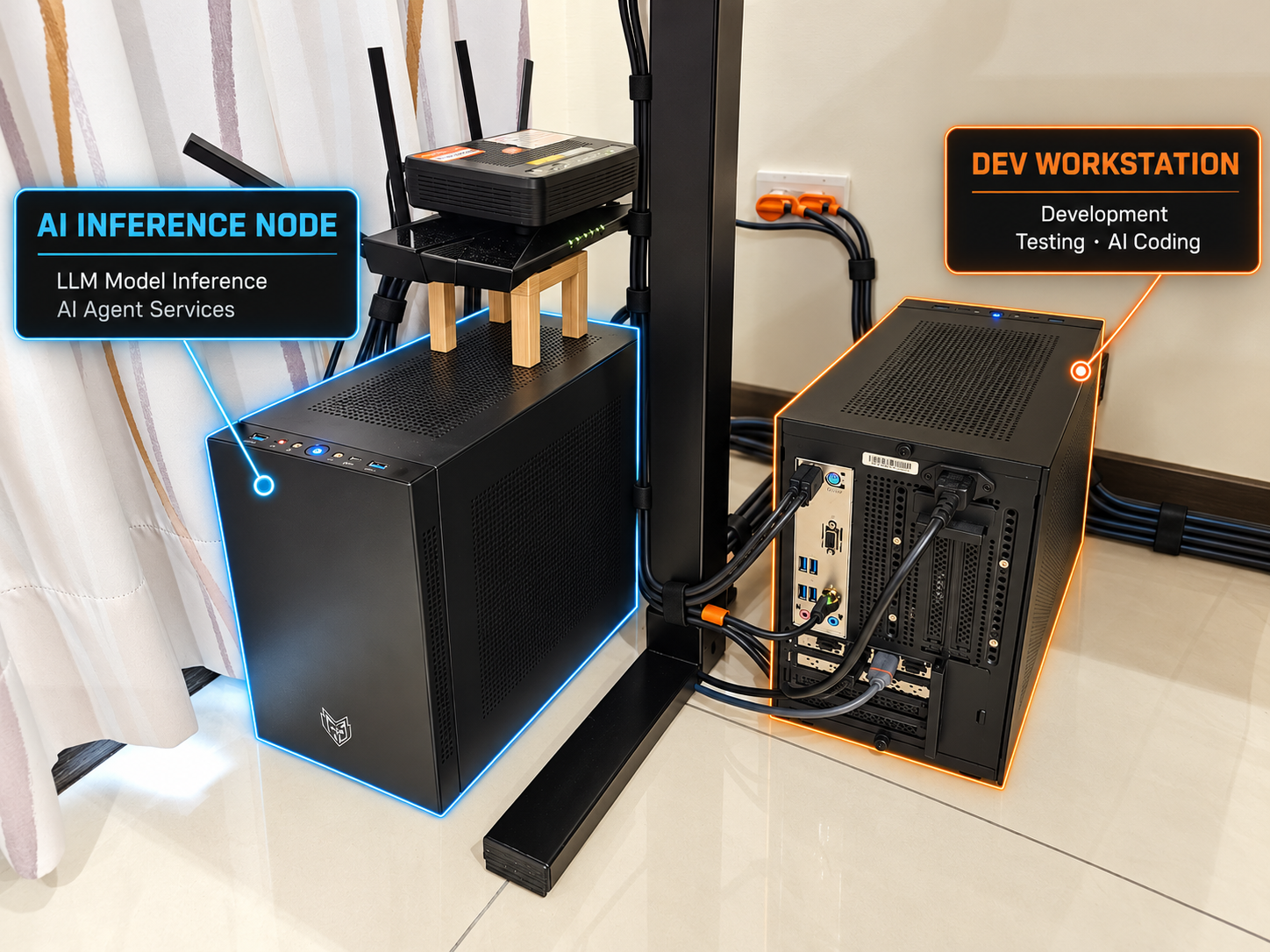
Dual-machine setup: dedicated resources for inference and development
In the photo above, the AI INFERENCE NODE on the left handles model inference and AI agent services, while the DEV WORKSTATION on the right handles software development, testing, and AI-assisted coding. Each machine has its own CPU, GPU, and memory, so inference services and development tasks do not compete for resources on the same computer. This also leaves the inference node’s memory available for the model.
Moving the IDE, builds, and tests to the DEV WORKSTATION reduces RAM usage on the AI INFERENCE NODE, freeing up more of its 64GB of RAM for model loading and inference. The dual-machine setup makes room for larger models by leaving more RAM available on the inference node. For a configuration with limited memory headroom, such as the one tested in this article, this is the practical value of separating inference services from everyday development.
| Component | AI INFERENCE NODE Inference machine (left) | DEV WORKSTATION Development machine (right) |
|---|---|---|
| Primary role | Model inference and AI agent services | Software development, testing, and AI-assisted coding |
| CPU | Intel Core i7-11700 | Intel Core i7-11700 |
| Motherboard | ASUS PRIME B560M-K | ASUS PRIME B560M-K |
| Graphics card | ASUS Dual GeForce RTX 5060 Ti 16GB | ZOTAC GAMING GeForce RTX 4060 8GB SOLO |
| Memory | Micron Crucial PRO DDR4-3200 64GB (32GB × 2) | ADATA DDR4-3600 32GB (16GB × 2) |
| SSD 1 | Corsair Force MP600 2TB | Corsair Force MP600 2TB |
| SSD 2 | Seagate FireCuda 520 2TB | Seagate FireCuda 520 2TB |
| HDD | Toshiba MG08ACA16TE 16TB × 1 | Toshiba MG08ACA16TE 16TB × 2 |
| Operating system | Windows 11 Home | Windows 11 Pro |
| Case | FSP CST350 | FSP CST350 |
| Power supply | FSP 550W (金鋼彈) 80 PLUS Gold / SFX | FSP 550W (金鋼彈) 80 PLUS Gold / SFX |



Discussion