
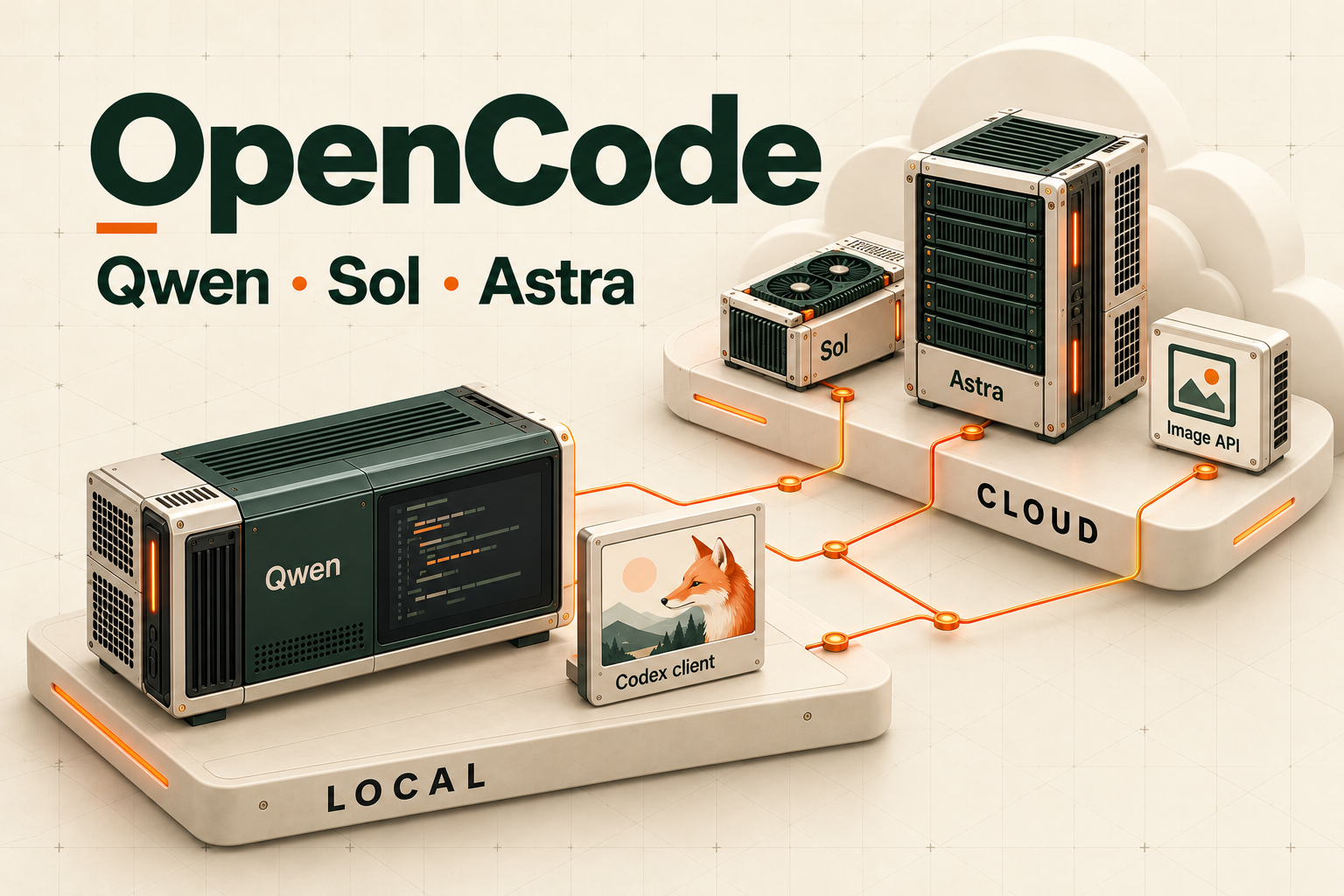
In my previous Strata test, I ran Qwen3.8-Flash-Next UD-IQ4_XS with 64 GB of RAM and an RTX 5060 Ti 16 GB. Once the model was running on my own computer, the next question was how to put it in charge of everyday development and give it access to the right help when needed.
My earlier approach had a cloud model assign work to local Qwen, with code review and harness adjustments shaping how it worked. This time, I put local Qwen in charge. OpenCode provides the ability to read files, make changes, run tests, and delegate work; GPT-6.1 Sol and GPT-6 Astra become subagents it can call when needed. Image generation is packaged as a separate tool that runs through local Codex.
As of October 25, 2026, this setup has passed checks for the default model in new conversations, both subagent routes, and the end-to-end workflow of generating an image, returning it to OpenCode, and opening it there. This article records the configuration I used, the problems I encountered, and what these tests do—and do not—establish.
Local Qwen Runs the Main Workflow, with Cloud Models Providing Help
The setup consists of three agents and one image tool:
| Component | How it runs | Responsibility in this setup |
|---|---|---|
| Qwen3.8 Flash Next UD-IQ4_XS | Local inference through Strata; primary agent in OpenCode | Understand requirements, plan, handle everyday implementation and testing, decide whether to delegate, and integrate results |
| GPT-6.1 Sol | Cloud subagent in OpenCode | Take on larger implementations and refactors across multiple files, or sustained debugging, once the direction is defined |
| GPT-6 Astra | Cloud subagent in OpenCode | Address unclear root causes, conflicting evidence, architectural tradeoffs, and complex problems |
| Codex image generation service | An OpenCode custom tool calls the local Codex CLI | Receive visual requirements, generate an image, and return a verified PNG to the project |
These are the roles I assigned for this workflow. Sol is not restricted to writing code, and Astra is not restricted to giving advice. Once given a clear scope for changes, either can implement and test directly. If a task calls only for diagnosis or review, it remains read-only.
Qwen retains responsibility for planning and acceptance. A simple change can be delivered once it meets the acceptance criteria. I do not automatically schedule another model to review every change.
The collaboration works as follows:
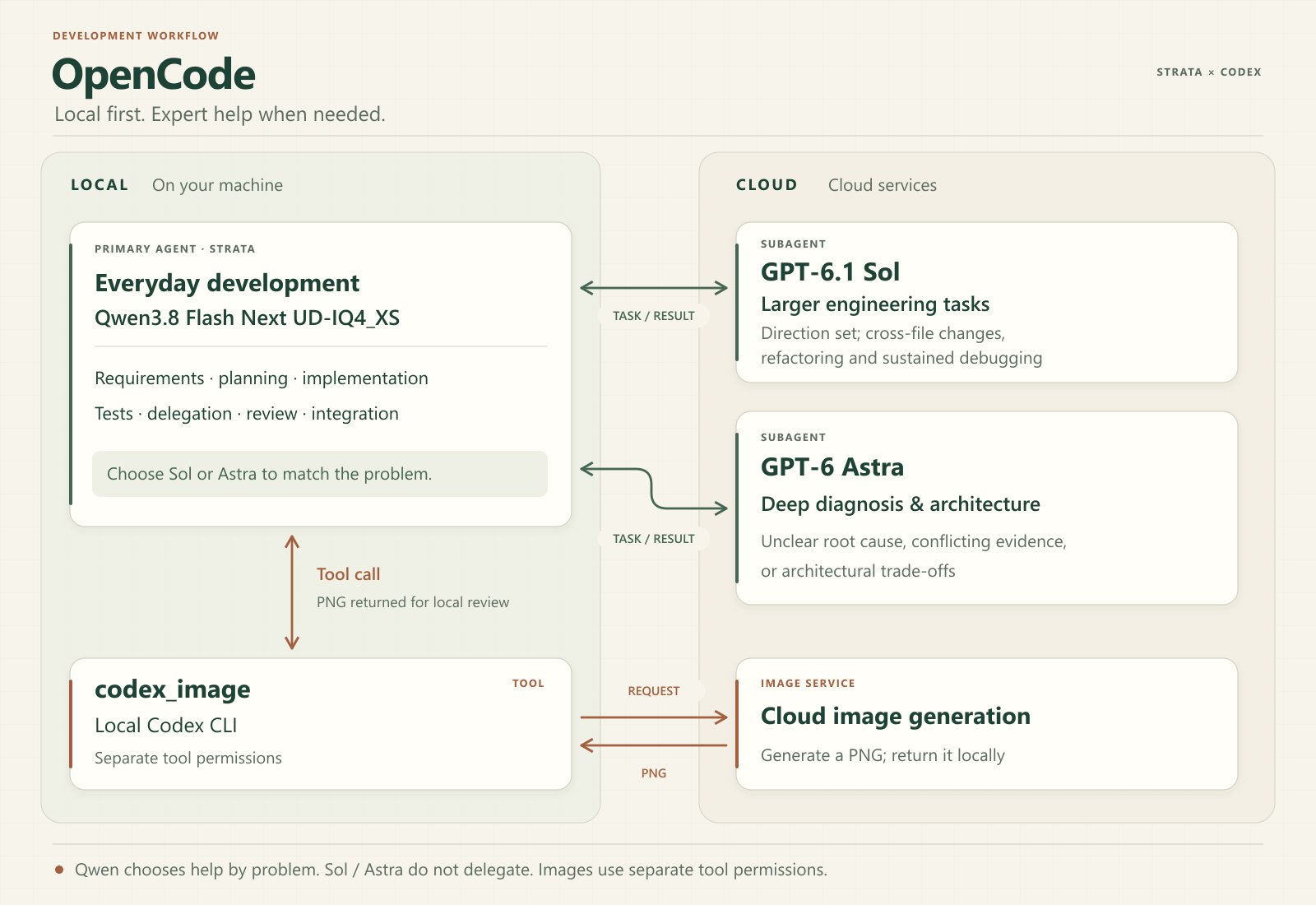
“Local” describes where Qwen inference runs and where the Codex CLI is launched. Sol, Astra, and image generation still use cloud capabilities. Task content sent to those helpers also goes to the cloud as part of the request.
Define When to Delegate and What to Include in a Handoff
I added several decision rules to Qwen’s working instructions.
Qwen handles tasks itself when the objective is clear, the scope is manageable, and the acceptance criteria are explicit. When the direction is already settled but the work requires substantial implementation across files or sustained debugging, it can delegate to Sol. When the root cause is unclear, the evidence conflicts, or architectural tradeoffs are involved, it can go directly to Astra.
Qwen therefore does not have to ask Sol first and wait for that attempt to fail before asking Astra. The choice depends on the problem.
Another rule is to stop retrying alone and seek help if two materially different fixes produce no progress on the same problem, or if it starts repeating approaches already shown to be ineffective. Simply rerunning a command or rephrasing an instruction does not count as a new fix. A test that still fails does not necessarily mean no progress has been made.
These are working rules in the agent prompt, and the model still decides how to apply them. I have not implemented a separate failure counter or an automatic model-switching state machine.
Each subagent starts a new conversation, so every handoff must include:
- The task objective and observable acceptance criteria.
- The workspace, relevant files, existing changes, and constraints on what must not be changed.
- Whether the task is read-only diagnosis or permits changes and testing.
- Error output, reproduction steps, approaches already tried, and their results.
- The changes, validation results, and remaining uncertainties that must be reported back.
For shared files, I also added a rule that only one agent may modify the same scope at a time. Once a helper takes over, Qwen pauses changes within that scope until the result comes back. A patch that has already been applied should not be applied again. This coordination rule is also specified in the prompt; I have not added file locks.
Model and Permission Settings in OpenCode
This setup uses OpenCode 2.0.32, with configuration in the user’s global configuration directory. On Windows, the layout is:
C:\Users\<your-account>\.config\opencode\
├─ opencode.json
├─ agents\
│  ├─ qwen-main.md
│  ├─ sol.md
│  └─ astra.md
└─ plugins\
   └─ codex-image\
OpenCode V2 supports agent definitions in Markdown files, including the model, mode, permissions, and working instructions. Global agent files apply across projects. The excerpts below show the settings applied here, with the existing provider, MCP, and other plugin configuration omitted. OpenCode agent documentation
{
  "default_agent": "qwen-main",
  "model": "strata/qwen3.8-flash-next-unsloth-ud-iq4_xs",
  "permissions": [
    {
      "action": "subagent",
      "resource": "*",
      "effect": "deny"
    }
  ]
}
Merge this excerpt into the existing configuration rather than using it to replace the entire file. It assumes that the Strata provider and OpenAI login have already been configured, and that the current OpenCode environment can resolve the model identifiers. The strata/...unsloth... identifier retained here belongs to the existing service configuration. This routing test did not recheck which weight version the backend had actually loaded.
In qwen-main.md, the primary agent is allowed to delegate to only two agents:
---
mode: primary
model: strata/qwen3.8-flash-next-unsloth-ud-iq4_xs
permissions:
  - action: subagent
    resource: "*"
    effect: deny
  - action: subagent
    resource: sol
    effect: allow
  - action: subagent
    resource: astra
    effect: allow
---
The mode, model, and delegation permissions in sol.md are:
---
mode: subagent
model: openai/gpt-6.1-sol
permissions:
  - action: subagent
    resource: "*"
    effect: deny
---
For astra.md, they are:
---
mode: subagent
model: openai/gpt-6-astra
permissions:
  - action: subagent
    resource: "*"
    effect: deny
---
These are excerpts from the configuration sections. The Markdown body becomes the agent’s system prompt, replacing the provider’s default prompt, so the complete agent files also retain the full development, tool-use, handoff, and acceptance rules. Model names and permissions alone do not express the entire working process.
The global deny rule for subagent: "*" remains in place. OpenCode applies global permissions first, then the agent’s own rules, with the last matching rule taking effect. Qwen can therefore explicitly allow Sol and Astra, while agents without an explicit allowance remain subject to the global restriction. OpenCode permission merging and rule order
The current delegation relationships are:
| Initiator | May delegate to |
|---|---|
| Qwen primary agent | Sol, Astra |
| Sol | None |
| Astra | None |
| Other agents without an explicit allowance | None |
I kept this single-level structure, without adding a Qwen worker, multiple levels of delegation, or extra concurrency scheduling for Strata. That makes ownership and handoffs easier to track for each task.
One detail is easy to miss after changing the configuration: existing conversations retain their own agent and model selections. New defaults do not automatically replace those choices. I therefore created a new conversation without specifying an agent or model, and without a separate project configuration overriding the defaults, to confirm that it actually used Qwen.
The complete agent files, image plugin, and configuration merge example are available in the companion source code. To reproduce the setup, first confirm that OpenCode’s Strata and OpenAI connections work, then separately confirm that the local Codex CLI is signed in with ChatGPT. The login states must be checked separately. Next, back up the existing configuration, add the agent files and plugin, merge the settings, and reload. Finally, create a new conversation and test each part. The accompanying instructions list the file locations and verification commands.
Verify the Sol and Astra Routes by Having Them Read a File
A model appearing in a menu only shows that it can be selected. To check whether delegation actually worked, I set up a small test: Qwen launched Sol and Astra separately and asked each to read a test file in the workspace and return a value written into it beforehand.
Validation covered both the replies and the tool execution records and model identifiers in the child conversations.
| Test | Observed result |
|---|---|
| New conversation with no agent or model specified | Resolved to qwen-main and Strata Qwen |
| Qwen delegates to Sol | The subagent read the file and returned the correct test value |
| Sol model record | openai/gpt-6.1-sol |
| Qwen delegates to Astra | The subagent read the file and returned the correct test value |
| Astra model record | openai/gpt-6-astra |
This test explicitly instructed Qwen to use both helpers, and the task involved no code changes. It demonstrated that the connections, delegation, file-reading tools, and return of results worked.
Whether Qwen chooses the right time to ask for help during real development, and whether this division of work improves completion rates or reduces time, requires a separate evaluation using programming tasks. The roles are configured, but their practical development benefits still need to be measured.
Expose Local Codex Image Generation as a Tool
Image generation follows a separate path.
OpenCode could already use Sol and Astra through the existing login, but image generation still needed a corresponding tool entry point. I first confirmed that local Codex could generate an image, then packaged the process as an OpenCode plugin exposing a tool named codex_image.
This is a custom tool built for this setup. Writing codex_image in a prompt does not automatically give an OpenCode installation that capability if the plugin has not been installed.
The actual call flow is:
- Qwen turns the intended use, subject, composition, and style into an image request.
- OpenCode calls
codex_image. - The plugin launches the local Codex CLI and confirms that it is using the existing ChatGPT login.
- Codex uses its built-in image generation capability to produce an image file.
- The plugin checks the file and copies it into the current project.
- Qwen uses
readto open the delivered file; its working instructions also require checking whether the image meets the request.
The image tool is configured to run its Codex task with GPT-6.1 Sol at low reasoning effort. This execution layer is separate from OpenCode’s sol subagent, and the image test did not first delegate to Sol or Astra. Here, Sol carries out the image task, while Codex’s image generation capability produces the actual image.
OpenAI’s documentation states that built-in image generation in Codex counts toward regular Codex usage, while API-key use follows the API billing path. This setup uses the existing ChatGPT login, with no separately configured Images API key and no fallback that automatically switches to an API key after a failure. Codex image generation documentation
Integrating an existing subscription therefore still consumes usage allowance. This test did not measure how much allowance each image used, nor did it convert API token prices into a subscription cost.
The First Obstacle Was Delivering the Image
Both initial local Codex tests produced images, but the overall process did not pass immediately.
The problem occurred at the final step: the child process was blocked by the file-permission policy when it tried to copy the image to the designated project location. The image existed, but delivery to the requested location had not been completed, so the full process could not yet be counted as successful.
The final version separates those two responsibilities:
- Codex saves the original output through its existing image generation mechanism.
- The OpenCode plugin verifies the source and image data, then copies the file into the project.
This preserves the Codex child process’s read-only sandbox setting while letting the caller handle the destination and file checks.
Validation goes beyond checking the file extension. The plugin checks that the file belongs to the generation directory newly created for this request, that its timestamp and resolved path are appropriate, and that the PNG structure and pixel data can be decoded. This helps prevent an old image or an unreadable file from being accepted as a new result.
A smaller installation issue also came up: the plugin was initially loaded automatically from the global directory and explicitly added to the configuration array, causing duplicate registration. After the duplicate entry was removed, the plugin list contained only one local.codex-image entry.
The Complete Process Returned a PNG That Could Be Opened
The final test started with OpenCode’s Qwen primary agent and requested an image of a ceramic red fox figurine. An example of the request accepted by the tool is:
{
  "prompt": "A ceramic red fox figurine, soft natural daylight, an off-white background, realistic product photography, no text.",
  "output_name": "fox"
}
The recorded results were:
| Item | Result |
|---|---|
OpenCode codex_image calls |
1, completed |
| Delivered file | PNG |
| Image dimensions | 1374 × 1145 |
| Tool execution time | 34,651 ms, approximately 34.7 seconds |
| Qwen opens the image | read completed |
| Complete workflow validation | Passed |
The 34.7 seconds is the duration of this one runner invocation, including the login check, Codex execution, image validation, and copying. It is neither the total waiting time for the OpenCode conversation nor an average across multiple images.

The tool creates a separate output directory for every invocation, containing the image and related records. The general output path is:
<current-project>/output/codex-images/<job-name>-<unique-id>/image.png
There is another boundary to this verification: the JSON events from the Codex CLI version used here did not include a complete record of calls to the built-in image tool, so the result retains nativeToolCallVerified: false. We verified the newly generated file, its readability, and delivery through OpenCode. We did not treat the model’s own report of a tool name as a complete audit of internal tool calls.
For the accompanying tests, 21 runner tests and 6 tool-entry tests passed. Two additional tests involving symbolic links or junctions were skipped because the test environment did not permit creating those links.
In Everyday Use, Describe the Work Directly
After installing the tool, I added this instruction to Qwen:
When a new image is needed, use the provided
codex_imagetool.
An everyday request can therefore be phrased directly:
Generate a homepage illustration about smart agriculture, with a simple style, a green palette, and empty space on the left for a heading.
The user does not need to remember the tool name. Qwen should infer that image generation is needed, prepare the parameters, and call the tool. More complex composition or visual planning can also be delegated to Sol, while Astra can help with broader visual direction and difficult design problems.
Sol and Astra’s working instructions also allow them to use the image tool within the scope of their delegated tasks. codex_image has its own tool permission, separate from the subagent permission for launching subagents. Preventing them from delegating further does not prevent them from using image generation.
The complete workflow test explicitly named the image tool. Whether natural-language requests consistently lead to the correct tool choice still needs validation through further use. The instructions are in place, but one successful explicit request does not guarantee correct execution for every phrasing.
The tool currently supports only generating new images from text; reference images and edits to existing images have not been integrated. The Codex generation stage has an 8-minute timeout, with additional time for the login check, process termination, and file validation. Failures, cancellations, and timeouts do not trigger automatic retries; results and errors should be checked first. Stopping the local process also cannot guarantee that generation already underway in the cloud is cancelled at the same time.
Next: Measure Real Development Tasks
This work establishes a verifiable workflow: local Qwen takes charge of new conversations, Sol and Astra can receive tasks and return results, and image requests can produce files through local Codex and return to OpenCode to be opened.
The next useful measurements come from actual development tasks: the proportion Qwen completes on its own, why helpers are brought in, whether handoffs contain enough information, the time needed to pass tests, and subscription usage. Those data will make it possible to judge whether the current division of work is appropriate or whether some tasks should be delegated earlier.
Until enough of those measurements have accumulated, I will keep the current single-level delegation structure. Qwen will continue to own the requirements and delivery, Sol and Astra will take on tasks where there is a clear reason to bring them in, and images will be delivered through the verified tool workflow.


Discussion