

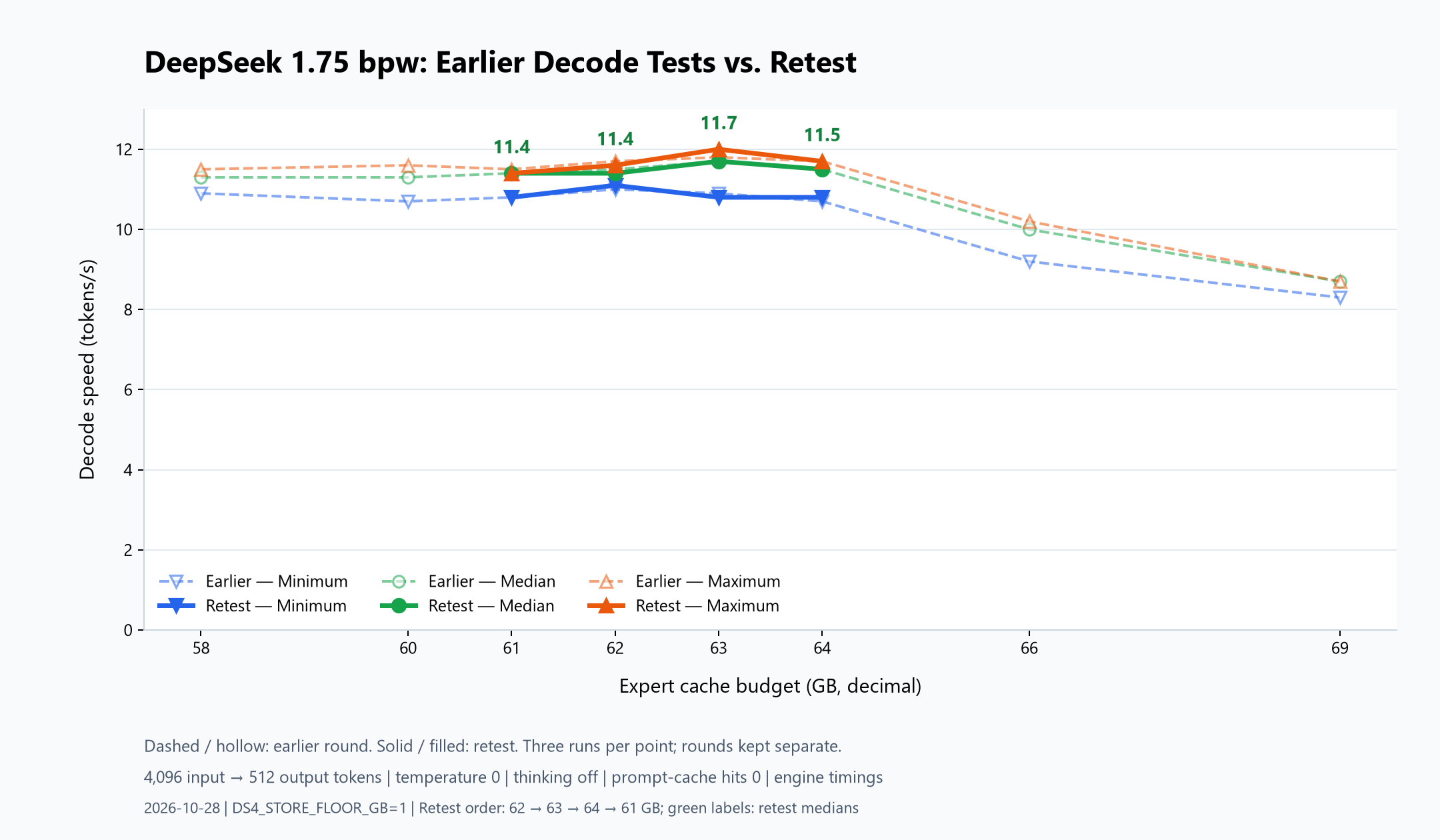
How much expert-cache budget should you configure for DeepSeek 763.2B in its 1.75 bpw quantized form on a machine with 64 GB of RAM and an RTX 5060 Ti 16 GB? This test compared --ssd-cache settings from 58 to 69 and then retested 61–64. The setting --ssd-cache 63 produced a median decode speed of 11.7 tokens/s in both rounds; --ssd-cache 69 produced 8.7 tokens/s in the earlier round. The comparison is between configured budgets—not claims that those amounts of model data were resident in RAM.
--ssd-cache 69 specifies a nominal 69 GB budget for the RAM expert store, using decimal GB. It does not establish that a 64 GB RAM machine held 69 GB of expert data in physical memory. Actual usage depends on slot allocation, loaded data, available RAM, and reclamation.This article preserves two rounds totaling 36 text-only code requests, measured on October 28, 2026. Each budget included in a round was tested three times. The rounds remain separate, are not pooled into six samples, and are compared by their medians rather than their fastest individual runs.
Configured budget, resident cache, and available RAM
Three quantities need to be kept separate: the machine’s installed RAM, the nominal expert-store budget supplied to the engine, and the memory actually used or still available during inference. The --ssd-cache name is potentially confusing: for this DeepSeek engine it controls the nominal budget of the RAM expert store, not SSD usage. Raising that setting is not evidence that the entire budget was allocated or stayed resident.
The unit conversion does not, by itself, explain the apparently oversized setting. A 63 decimal GB budget is approximately 58.67 GiB; a 69 decimal GB budget is approximately 64.26 GiB. The latter is still larger than this system’s 62.56 GiB MemTotal. The relevant distinction is therefore configured budget versus actual resident usage, alongside the engine’s allocation and reclamation behavior—not just GB versus GiB.
Throughout the tables and chart below, the GB labels identify nominal budgets. “Min. available RAM” is a separate observation from MemAvailable; it is not a measurement of how much expert cache was resident.
The source makes the distinction concrete: the engine first reserves an address range based on the budget, then commits memory in chunks as slots are needed. Before growing the store, it checks that available RAM can accommodate the new chunk while leaving the configured floor; a failed allocation is not counted as an acquired chunk. Reserving address space does not mean the same amount of data is resident in physical RAM. See ds4_store.hpp in Strata v0.2.7.
Test system: 64 GB RAM and an RTX 5060 Ti 16 GB
- CPU: Intel Core i7-11700.
- GPU: NVIDIA GeForce RTX 5060 Ti 16 GB; HDMI output is handled by Intel UHD 750.
- Memory: 64 GB RAM, with Linux reporting approximately 62.56 GiB in MemTotal.
- OS and model storage: Ubuntu Server 24.04.5 LTS minimized, on a Corsair Force MP600 SSD.
- Inference software: Strata Terminal 0.2.7, Control/Engine 0.1.52 (CUDA 13), and NVIDIA driver 615.71.09.
- Model: ISTA-DASLab’s DeepSeek-V4.1-Flash-1017 GSQ-RCO IQ1_M, a 763.2B-parameter model in its 1.75 bpw quantized form.
- Inference settings: An 8,192-token context limit; Faster mode, using 5 routed experts per token. DSpark was set to auto but was not loaded at startup, and draft_n was 0 in every response.
763.2B is the total parameter count; 1.75 bpw describes quantization precision. The model has approximately 763.2 billion parameters. The 1.75 bpw figure is the average storage bit-width of the Transformer weights; the Engram lookup weights use a separate, fixed precision. Quantization reduces weight storage requirements while preserving the total parameter count. See the model parameter and quantization details.
These results apply to this quantization and inference configuration. Answer quality was not evaluated, and the figures should not be treated as performance measurements for the full 6-expert mode or other quantizations. See the ISTA-DASLab model card for quantization details and the Strata v0.2.7 DeepSeek documentation for inference modes.
Method: 4K input and a full 512-token output
Each request used a Python inventory/transaction and unittest code workload, with exactly 4,096 input tokens, including the chat template, and a full 512-token output. Temperature was 0 and thinking was disabled. “4K” refers to the input length; the server’s context limit remained 8K.
- The engine was restarted once for each tested budget. After the model was ready, three requests ran consecutively, with no extra warm-up requests. The engine was not restarted before every request.
- Every response was checked against both API usage and engine timings: 4,096 input tokens, 512 output tokens, 0 prompt-cache hits, finish_reason of length, and no reasoning output.
- Speeds came from the engine’s decode timings. Requests ran through the Ubuntu host’s loopback API, with SSH used to control the procedure. The figures do not include Tailscale network round-trip time.
- All groups used
DS4_STORE_FLOOR_GB="1". Only the nominal budget specified by--ssd-cachewas changed. - The OS file cache was not cleared, and the test order was not randomized. The first request in every group was slower. Cache or warm-up state may have contributed, but this test did not isolate the cause.
The earlier round tested nominal budgets in the order 62 → 64 → 66 → 69 → 60 → 58 → 63 → 61 GB, totaling 24 requests. The retest ran 62 → 63 → 64 → 61 GB, totaling 12 requests. This article compares decode performance only; no new, independent 32K prefill test was performed.
Earlier round: increasing the budget did not always improve speed
The first column is the configured nominal budget in decimal GB. All speeds are in tokens/s. “Min. available RAM” is the lowest MemAvailable observed during that group’s three requests, in GiB. The three decode speeds are listed in execution order.
| Nominal cache budget | Three decode runs | Minimum | Median | Maximum | Min. available RAM |
|---|---|---|---|---|---|
| 58 GB | 10.9 / 11.5 / 11.3 | 10.9 | 11.3 | 11.5 | 7.48 GiB |
| 60 GB | 10.7 / 11.3 / 11.6 | 10.7 | 11.3 | 11.6 | 5.88 GiB |
| 61 GB | 10.8 / 11.4 / 11.5 | 10.8 | 11.4 | 11.5 | 5.21 GiB |
| 62 GB | 11.0 / 11.7 / 11.5 | 11.0 | 11.5 | 11.7 | 4.70 GiB |
| 63 GB | 10.9 / 11.8 / 11.7 | 10.9 | 11.7 | 11.8 | 4.03 GiB |
| 64 GB | 10.7 / 11.5 / 11.7 | 10.7 | 11.5 | 11.7 | 3.77 GiB |
| 66 GB | 9.2 / 10.0 / 10.2 | 9.2 | 10.0 | 10.2 | 2.76 GiB |
| 69 GB | 8.3 / 8.7 / 8.7 | 8.3 | 8.7 | 8.7 | 1.10 GiB |
Retest: the 63 GB nominal budget again reached an 11.7 median
The second round retested nominal budgets of 61–64 GB. The engine was restarted for each setting, followed by three new requests. All earlier data were retained; the results below were not pooled with them. The 69 GB budget was not retested in this round.
| Nominal cache budget | Three decode runs | Minimum | Median | Maximum | Min. available RAM |
|---|---|---|---|---|---|
| 61 GB | 10.8 / 11.4 / 11.4 | 10.8 | 11.4 | 11.4 | 5.21 GiB |
| 62 GB | 11.1 / 11.4 / 11.6 | 11.1 | 11.4 | 11.6 | 4.48 GiB |
| 63 GB | 10.8 / 11.7 / 12.0 | 10.8 | 11.7 | 12.0 | 4.26 GiB |
| 64 GB | 10.8 / 11.5 / 11.7 | 10.8 | 11.5 | 11.7 | 3.80 GiB |
Download the CSV with all 36 individual results from both rounds. The file includes the round, configured cache budget, speed of each run, group median, minimum available RAM, and peak engine swap usage.
Comparing the 62 and 63 GB budget settings
The setting --ssd-cache 62 had a narrower range of individual speeds: maximum minus minimum was 0.7 and 0.5 tokens/s in the two rounds. With --ssd-cache 63, the ranges were 0.9 and 1.2 tokens/s. Judged by run-to-run variation, the 62 GB budget was more consistent, and it also left more available RAM.
The median describes typical speed while reducing the influence of an unusually fast or slow run. Both medians with --ssd-cache 63 were 11.7, compared with 11.5 and 11.4 with --ssd-cache 62, and 11.5 in both rounds with --ssd-cache 64. On this machine, with its 8K context limit and this code workload, the 63 GB budget therefore had the highest typical decode speed among the tested settings. Its advantage over the nearby 61, 62, and 64 GB budgets was about 1.7–2.6%.
A narrower speed range does not mean a lower risk of crashing. Neither the 62 nor the 63 GB budget caused engine swapping or an OOM event during these tests. With only three requests per round and a non-randomized order, a difference of about 2% does not establish the same advantage across all workloads. No claim of statistical significance is made here.
Memory observations: no engine swapping, but more reclamation
Across all tested budgets in both rounds, peak engine VmSwap and peak swap usage for the Strata service cgroup were both 0, with no OOM events. Other processes on the system still showed paging activity, so this should not be described as “the entire machine never used swap.”
RAM store reclamation provides another observation. In the earlier round, nominal budgets of 58, 60, 61, 62, and 63 GB had no reclamation events. The 64 GB budget recorded 24 events / 48 chunks; the 66 GB budget, 93 events / 288 chunks; and the 69 GB budget, 96 events / 489 chunks. In the retest, the 61, 62, and 63 GB budgets still had 0, while the 64 GB budget recorded 20 events / 40 chunks.
Larger configured budgets coincided with more reclamation activity in this environment. They should not be read as amounts that remained fully resident throughout the test. Reclamation may affect performance, but this variable was not isolated, so it cannot be identified as the sole cause of the slowdown. The slower results with the 66 and 69 GB budgets also cannot be attributed solely to engine data moving into swap, because the measured engine swap usage remained 0.
The floor setting is not a guaranteed RAM reserve
In this version, DS4_STORE_FLOOR_GB="1" sets a 1 GiB threshold checked when the cache grows. It does not guarantee that the system will always retain 1 GiB of available RAM. The source also has a separate reclamation check: when available RAM falls below 4 GiB, it attempts to release chunks, calculating the amount toward approximately 5 GiB. Setting the floor to 1 does not disable this mechanism. See ds4_model.cu in Strata v0.2.7.
--ssd-cache 63
DS4_STORE_FLOOR_GB=1
These are the key parameters for the tests with the nominal 63 GB budget. All 36 requests were text-only code workloads. Approximately 4 GiB of available RAM during these tests is not a guarantee for image input, longer contexts, or concurrent users. After testing, the host was restored to automatic cache sizing while retaining floor=1; --ssd-cache 63 has not been permanently applied.
Choosing a budget for this machine
For typical decode speed on this code workload, --ssd-cache 63 was the best setting observed in these tests: its median was 11.7 tokens/s in both rounds, there was no engine swapping, and minimum available RAM was approximately 4.03–4.26 GiB. The setting --ssd-cache 62 was about 2% slower, but left more RAM available and had a narrower range of individual speeds in both rounds.
The practical choice is a measured trade-off between decode speed and RAM headroom. A higher nominal budget does not prove that more cache stayed resident, or that inference became faster. On this 64 GB RAM machine, the 69 GB budget produced a lower median than the 63 GB budget; the measurements establish that result, while leaving the precise contribution of reclamation and other effects unresolved.